Apple iPhone 16 128 GB: 5G Mobile Phone with Camera Control, A18 Chip and a Big Boost in Battery Life. Works with AirPods; White
₹76,999.00 (as of October 27, 2026 17:07 GMT +05:30 - More infoProduct prices and availability are accurate as of the date/time indicated and are subject to change. Any price and availability information displayed on [relevant Amazon Site(s), as applicable] at the time of purchase will apply to the purchase of this product.)
Samsung Galaxy M07 Mobile (Black, 4GB RAM, 64GB Storage) | MediaTek Helio G99 | AnTuTu 624K | IP54| 50MP Camera | 7.6mm Slim | 5000mAh Battery | 25W Fast Charging | 6 Gen OS Upgrades | Without Charger
₹11,999.00 (as of October 27, 2026 17:07 GMT +05:30 - More infoProduct prices and availability are accurate as of the date/time indicated and are subject to change. Any price and availability information displayed on [relevant Amazon Site(s), as applicable] at the time of purchase will apply to the purchase of this product.)
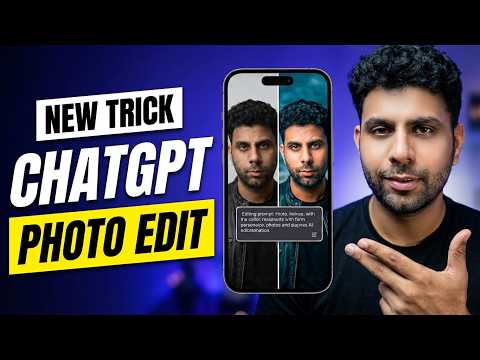
Watch the original video: ChatGPT Photo Editing Guide: Master AI Image Prompts
Disclosure: This post may contain affiliate links. If you buy through them, Informative Media may earn a small commission at no extra cost to you.
Quick Summary
- Discover a powerful master prompt for ChatGPT photo editing.
- Learn a unique interactive trick to guide AI edits with 25 pointers.
- Understand prompt structure for both generic and custom rules.
- Get a step-by-step guide to download and set up the prompt.
- See a live demo of AI photo transformation in action.
Amazon Finds
Recommended Products
Mastering AI Photo Edits with ChatGPT: Your Ultimate Prompt Guide
Tired of AI photo editing feeling like a guessing game? If you’ve ever wished you could tell ChatGPT *exactly* what you want done to your images and have it actually understand, you’re in the right place. We’re diving deep into a game-changing technique that makes AI photo editing accessible and powerful, even for beginners.
This comprehensive guide draws from the insights shared in the ChatGPT Photo Editing Guide: Master AI Image Prompts video. It’s designed to help you unlock the full potential of conversational AI for transforming your photos.
The Challenge: Getting AI to Listen
Often, getting AI to perform specific edits can be frustrating. Generic prompts yield generic results, and trying to describe complex adjustments can lead to confusion. The key is a structured approach, and that’s where our master prompt comes in.
Introducing the Master Prompt: Your AI Editing Blueprint
The core of this method is a specially crafted master prompt. This isn’t just a few keywords; it’s a detailed blueprint that tells ChatGPT precisely how to approach your image editing tasks. It’s designed to be both comprehensive and customizable, ensuring you get results that align with your vision.
Decoding the Prompt Structure
Understanding how the prompt is built is crucial. It typically involves two main parts:
- Generic Rules: These are the foundational instructions that tell ChatGPT the overall style and principles of editing. Think of them as the ‘base settings’ for any edit.
- Custom Rules: This is where you inject your specific needs. This section allows for detailed instructions, ensuring the AI focuses on the unique aspects of your image and desired outcome.
By breaking down the prompt this way, you can easily modify it for different editing scenarios.
Getting Your Hands on the Prompt
Ready to try it yourself? The video tutorial provides a direct link to download the master prompt file. Setting it up is straightforward:
- Download the Prompt: Access the file via the provided link.
- Set Up a New Chat: Start a fresh conversation in ChatGPT.
- Paste and Go: Copy the content of the downloaded prompt and paste it into your chat window.
ChatGPT’s Interactive Photo Editing Trick
Beyond the master prompt, there’s an incredibly useful interactive trick that makes refining your edits much simpler. Instead of re-writing entire prompts, you can guide ChatGPT through a series of specific adjustments. The video demonstrates how to use this method to apply up to 25 detailed editing pointers, offering a level of control that feels almost manual but is powered by AI.
Live Demo: Seeing the Transformation
The best way to understand the power of this technique is to see it in action. The tutorial includes a live demonstration where you can witness the master prompt and interactive trick being applied to an image. You’ll see firsthand how dramatic the transformations can be, from subtle enhancements to complete stylistic overhauls.
Elevate Your Digital Artistry
Whether you’re looking to improve your social media posts, create stunning visuals for projects, or simply explore the creative possibilities of AI, this ChatGPT photo editing guide offers a practical and effective solution. By mastering AI image prompts, you can save time, achieve professional-quality results, and push the boundaries of your digital creativity.
For more tips on leveraging AI, check out our guide on creating viral 80s AI photos with ChatGPT, or learn how to delete your ChatGPT history for better privacy.
Frequently Asked Questions (FAQ)
- What makes this ChatGPT prompt a ‘master’ prompt?
- It’s a comprehensive, structured prompt designed to guide ChatGPT through complex editing tasks with clarity, allowing for both general rules and specific custom instructions.
- Can I use this with any image?
- Yes, the prompt is designed to be versatile and can be adapted for various types of images. The custom rules section allows you to tailor it to specific subjects and styles.
- Is this suitable for beginners?
- Absolutely. The guide breaks down the prompt structure and includes a live demo, making it easy to follow even if you’re new to AI photo editing.
- What is the ‘interactive photo editing trick’?
- It’s a method that allows you to guide ChatGPT through a list of specific editing adjustments conversationally, refining the image without needing to rewrite complex prompts each time.
- Do I need a paid ChatGPT subscription for this?
- The video description and prompt details do not specify a paid subscription requirement, suggesting it should work with the standard ChatGPT interface.

Samsung Original 25W USB Type-C Travel Adaptor Without Cable for Google Pixel, Xiaomi, Motorola, iPhone, Samsung Galaxy Tab S/A Series, Galaxy S10/M54/M55/A80/A90/S25/S24, Black
₹449.00 (as of October 27, 2026 17:07 GMT +05:30 - More infoProduct prices and availability are accurate as of the date/time indicated and are subject to change. Any price and availability information displayed on [relevant Amazon Site(s), as applicable] at the time of purchase will apply to the purchase of this product.)