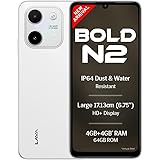
Lava Bold N2 (Siachen White, 4 GB RAM, 64 GB Storage) | 13MP AI Dual Rear Camera | Largest 6.75" HD+ Display | 5000 mAh Battery & 10W Charging | IP64 Water & Dust Proof | Charger & Phone-Case in Box
₹9,349.00 (as of October 27, 2026 17:07 GMT +05:30 - More infoProduct prices and availability are accurate as of the date/time indicated and are subject to change. Any price and availability information displayed on [relevant Amazon Site(s), as applicable] at the time of purchase will apply to the purchase of this product.)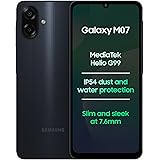
Samsung Galaxy M07 Mobile (Black, 4GB RAM, 64GB Storage) | MediaTek Helio G99 | AnTuTu 624K | IP54| 50MP Camera | 7.6mm Slim | 5000mAh Battery | 25W Fast Charging | 6 Gen OS Upgrades | Without Charger
₹11,999.00 (as of October 27, 2026 17:07 GMT +05:30 - More infoProduct prices and availability are accurate as of the date/time indicated and are subject to change. Any price and availability information displayed on [relevant Amazon Site(s), as applicable] at the time of purchase will apply to the purchase of this product.)
Watch the original video: Whatsapp Username – How to use it
Disclosure: This post may contain affiliate links. If you buy through them, Informative Media may earn a small commission at no extra cost to you.
Quick Summary
- WhatsApp now allows you to create a username, ditching the need to share your phone number for connections.
- Easily set up, edit, or change your username through WhatsApp settings.
- Enhance your privacy and security by using a username instead of your personal number.
- Understand who can see your username and manage your privacy settings effectively.
Amazon Finds
Recommended Products
The Problem: Sharing Your Number on WhatsApp
For years, WhatsApp has been our go-to for staying in touch, but it always came with a catch: you had to share your phone number. While convenient, this often meant exposing your personal number to people you might only interact with briefly, raising privacy concerns. Thankfully, WhatsApp is introducing a solution that many of us have been waiting for.
The Quick Answer: WhatsApp Usernames Are Here!
WhatsApp is rolling out a new feature that lets you create a unique username. This means you can connect with others on the platform without revealing your actual phone number, similar to how usernames work on Instagram and Telegram. This update is a game-changer for privacy and ease of connection.
How to Create and Use Your WhatsApp Username
Setting up your username is straightforward. Here’s a step-by-step guide:
- Open WhatsApp: Launch the app on your smartphone.
- Go to Settings: Tap on the ‘Settings’ option.
- Find ‘Account’: Navigate to the ‘Account’ section.
- Select ‘Username’: You should see a new ‘Username’ option here. Tap on it.
- Create Your Username: Enter your desired username. It needs to be unique.
- Save: Confirm your username.
Editing or Changing Your Username
Need to change your username? Just follow the same steps above and tap on your existing username to edit it.
How Does the WhatsApp Username Feature Work?
Once you have a username, people can find and message you by searching for your username instead of your phone number. This is particularly useful for businesses, creators, or anyone who wants to maintain a level of separation between their professional and personal contacts. You can still use your phone number for contacts already saved in your phone.
Username Privacy Settings Explained
WhatsApp is giving you control over your privacy with this new feature. You can manage who sees your username and how they can contact you. While the specifics might vary slightly as the feature rolls out, the general idea is to offer granular control over your visibility.
Who Can See Your WhatsApp Username?
Generally, your username will be visible on your profile. If someone searches for your username, they can initiate a chat with you. However, your phone number remains hidden unless you choose to share it.
Benefits of Using Usernames
- Enhanced Privacy: The most significant benefit is protecting your phone number from being shared widely.
- Improved Security: Reduces the risk of unwanted calls or messages from unknown numbers.
- Easier Connection: Simplifies finding and connecting with people without needing their contact details beforehand.
- Professionalism: Ideal for brands and professionals who want a dedicated contact point.
Common Mistakes to Avoid
- Choosing an Unmemorable Username: Make it easy for others to find you.
- Not Updating Privacy Settings: Ensure your settings align with your comfort level.
- Forgetting Your Username: Keep track of what you set up.
Pro Tips
- Consider linking your social media profiles if WhatsApp allows it in the future, similar to how you might manage your Instagram presence. Checking your Instagram requests might give you an idea of how direct messaging works on other platforms.
- Use this feature to connect with your audience if you’re a creator, much like managing your Instagram stories. Downloading Instagram stories could be a way to gauge content trends.
Frequently Asked Questions (FAQ)
What happens if someone already has my number saved?
If someone already has your phone number saved in their contacts, they will still be able to see your profile and message you on WhatsApp as usual. The username feature primarily helps when initiating new connections or when you want to share a contact method that isn’t your personal number.
Can I use emojis or special characters in my WhatsApp username?
Typically, usernames on most platforms are limited to letters, numbers, and sometimes underscores or periods. WhatsApp’s implementation will likely follow similar conventions, so it’s best to stick to alphanumeric characters.
Is the WhatsApp username feature available for everyone?
No, the feature is rolling out gradually. If you don’t see the option yet, be patient. It should become available to all users worldwide in the coming weeks or months.
This new WhatsApp username feature is a significant update that enhances privacy and offers a more flexible way to connect. Keep an eye out for the update and start thinking about your unique username!
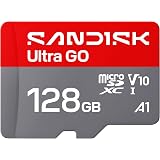
SANDISK 128GB Ultra Go microSD Card UHS-I, Up to 190MB/s, Full HD Video, Memory Card for Android Smartphones, Tablets, 10-Year Warranty
₹1,999.00 (as of October 27, 2026 17:07 GMT +05:30 - More infoProduct prices and availability are accurate as of the date/time indicated and are subject to change. Any price and availability information displayed on [relevant Amazon Site(s), as applicable] at the time of purchase will apply to the purchase of this product.)