Samsung Original 25W USB Type-C Travel Adaptor Without Cable for Google Pixel, Xiaomi, Motorola, iPhone, Samsung Galaxy Tab S/A Series, Galaxy S10/M54/M55/A80/A90/S25/S24, White
₹500.00 (as of October 27, 2026 17:07 GMT +05:30 - More infoProduct prices and availability are accurate as of the date/time indicated and are subject to change. Any price and availability information displayed on [relevant Amazon Site(s), as applicable] at the time of purchase will apply to the purchase of this product.)
Apple iPhone 16 128 GB: 5G Mobile Phone with Camera Control, A18 Chip and a Big Boost in Battery Life. Works with AirPods; White
₹76,999.00 (as of October 27, 2026 17:07 GMT +05:30 - More infoProduct prices and availability are accurate as of the date/time indicated and are subject to change. Any price and availability information displayed on [relevant Amazon Site(s), as applicable] at the time of purchase will apply to the purchase of this product.)
Watch the original video: Facebook Account kaise delete kare
Disclosure: This post may contain affiliate links. If you buy through them, Informative Media may earn a small commission at no extra cost to you.
Quick Summary
- Learn the exact steps to permanently delete your Facebook account using your mobile.
- Understand the crucial difference between deactivating and permanently deleting your account.
- Find out what happens after your account is deleted and how long you have to recover it.
- Get essential tips on what to consider before hitting delete.
Amazon Finds
Recommended Products
In today’s digital world, social media is a big part of our lives. But sometimes, you might feel the need to take a step back, perhaps for privacy reasons or just to disconnect. If you’re looking to permanently say goodbye to Facebook, our latest video shows you exactly how to do it from your mobile phone. Watch the full tutorial here: Facebook Account kaise delete kare.
This guide is designed to make the process straightforward, whether you’re trying to get a break from social media or removing your account for security concerns. We’ve broken down the steps so you can easily follow along.
Understanding Deletion vs. Deactivation
Before you hit that delete button, it’s important to know the difference between deactivating and permanently deleting your account. Deactivation is like a temporary pause. Your profile won’t be visible, but your information, like messages, will still be there if you decide to come back. Permanent deletion, on the other hand, is final. Your profile, photos, posts, and everything else will be removed and cannot be recovered once the grace period is over.
How to Permanently Delete Your Facebook Account from Mobile
Our video tutorial walks you through the exact steps, but here’s a quick rundown:
- Open your Facebook app and go to Settings & Privacy, then tap on Settings.
- Navigate to Account Center, and then to Personal details.
- Tap on Account ownership and control, and select Deactivation or deletion.
- Choose the account you want to delete and select ‘Delete Account’.
- Follow the on-screen prompts, which will include confirming your password and providing a reason for deletion.
Remember, Facebook gives you a specific window, usually around 30 days, to change your mind. After this period, your account and all its data will be permanently erased.
What Happens After Deletion?
Once your account is scheduled for deletion, you’ll be logged out. If you log back in before the grace period ends, the deletion process will be cancelled. If you don’t log in, everything associated with your account will be removed from Facebook. This includes your profile, photos, videos, posts, and messages.
Important Considerations Before Deleting
- Download your data: Before you delete, consider downloading a copy of your Facebook data, including your photos, posts, and personal information.
- Inform friends: Let your close friends know you’re leaving Facebook so they have a way to keep in touch.
- Check linked apps: If you use Facebook to log in to other apps or websites, you might need to update your login methods for those services.
Alternatives to Deleting
If you’re not ready for a permanent break, consider deactivating your account. It’s a great way to take a social media breather without losing your data. You can also adjust your privacy settings to limit who sees your content.
Taking control of your online presence is important. Whether you’re managing your smartphone’s privacy or deciding which apps to keep, staying informed is key. For more tech tips, check out our comparisons like Vivo X300 vs. Vivo X300 Pro: Which One Wins the Speed Test?, which can help you manage your digital tools more effectively.
Frequently Asked Questions (FAQ)
- Can I recover my Facebook account after deleting it?
- Yes, you have a grace period (usually 30 days) to cancel the deletion by logging back into your account. After this period, recovery is not possible.
- What is the difference between deactivating and deleting my Facebook account?
- Deactivating is temporary; your profile is hidden but can be reactivated. Deleting is permanent; your account and all data are removed after the grace period.
- Will my messages be deleted if I delete my account?
- Yes, all messages sent and received will be permanently deleted from Facebook’s servers once your account is deleted.
- Do I need a computer to delete my Facebook account?
- No, this guide and the video demonstrate how to delete your account directly from your mobile device.
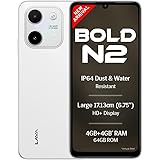
Lava Bold N2 (Siachen White, 4 GB RAM, 64 GB Storage) | 13MP AI Dual Rear Camera | Largest 6.75" HD+ Display | 5000 mAh Battery & 10W Charging | IP64 Water & Dust Proof | Charger & Phone-Case in Box
₹9,349.00 (as of October 27, 2026 17:07 GMT +05:30 - More infoProduct prices and availability are accurate as of the date/time indicated and are subject to change. Any price and availability information displayed on [relevant Amazon Site(s), as applicable] at the time of purchase will apply to the purchase of this product.)